
Venn
Find a time that works for everyone.
Free scheduling polls. Propose a few times, share one link, and see where everyone's availability overlaps.
No accounts. No ads. No tracking.


Try it at venn.day · Docs · Quick start · Self-hosting · Privacy · Contributing
Why Venn
Everyone's availability is a circle. Venn finds where they overlap.
- Free, with no accounts. Nobody signs up, not even the organizer. There are no ads and no trackers.
- Fast to set up. Pick dates on a calendar, add a few times, and copy them to every day with one click.
- Easy to answer, especially on a phone. Big Yes / If needed / No buttons for each time, with live tallies.
- Time zones handled. Everyone sees times in their own time zone automatically.
- Picks the best time for you. Options are ranked by how many people can make it, then by how many gave a firm yes.
- Check your calendar. Fill in your answers from Google Calendar, Outlook or a calendar file. Only busy/free times are read, in your browser, and nothing is stored on the server.
- AI when you want it. Describe a meeting in words and get a ready-to-check poll, let AI fill in your answers from your preferences, or get a summary and a suggested time. Optional; powered by Claude.
- Know when people answer. Get an email, or a message in Slack, Discord or any webhook, whenever someone responds.
- Straight into calendars. Once the time is picked, everyone gets Google, Outlook and Apple calendar links.
- Accessible. Works with a keyboard and screen readers, with WCAG AA contrast in light and dark mode. Checked automatically on every change.
- Yours to run. Host it free on Cloudflare, or on any server that runs Node.
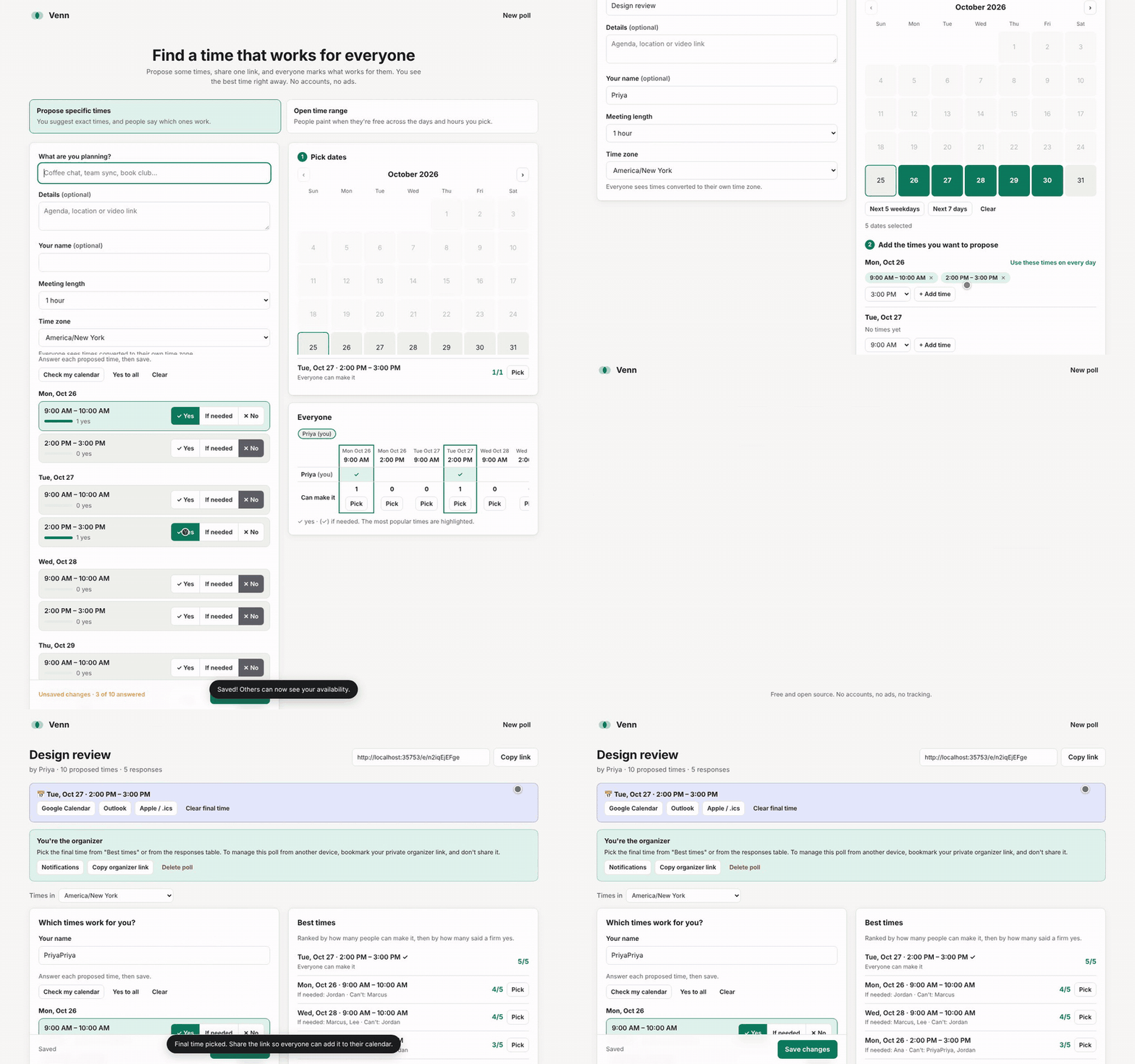
A quick tour
1. Propose some times
Pick the days, add the times you'd like to suggest, and share the link.

2. Everyone answers, on any device
People enter their name and tap what works. No app, no account.

3. See the overlap and pick a time
Best times ranks every option. The Everyone table shows who said what, with the most popular time highlighted. The organizer picks one, and everyone can add it to their calendar.

Two kinds of poll
| How it works | Best for | |
|---|---|---|
| Propose specific times | You suggest exact times. People answer each one with Yes, If needed or No. | Meetings where you already have a few slots in mind |
| Open time range | You pick the days and an hours window. People click and drag to paint when they're free, like a heatmap. | Wide-open planning, when you're not sure what works |
Quick start
You need Node.js 22.13 or newer.
git clone https://github.com/sephmard/venn.git
cd venn
npm install   # the browser code has no dependencies; the server uses the Anthropic SDK for optional AI
npm start     # http://localhost:8787
Polls are saved to data/venn.db (SQLite).
Try it at venn.day. All the docs are on docs.venn.day.
Self-hosting
Cloudflare (free)
Venn runs on Cloudflare Workers with a D1 database. The free plan is plenty for personal and team use.
Or deploy from your machine:
npx wrangler login
npx wrangler d1 create venn   # paste the database_id it prints into wrangler.toml
npx wrangler deploy
Tables are created automatically on the first request.
To deploy on every push to main with GitHub Actions, set the repository variables CLOUDFLARE_DEPLOY=true and D1_DATABASE_ID, and the secrets CLOUDFLARE_API_TOKEN and CLOUDFLARE_ACCOUNT_ID. The deploy workflow is off by default, so forks never try to deploy.
Optional features
| Feature | How to turn it on |
|---|---|
| Email notifications (Resend) | Set RESEND_API_KEY and EMAIL_FROM. See docs/NOTIFICATIONS.md. |
| Webhook notifications | Always on. Organizers add a URL from their poll. |
| Google Calendar / Outlook | Set GOOGLE_CLIENT_ID and/or MICROSOFT_CLIENT_ID. See docs/CALENDARS.md. |
| AI features (Claude) | Set ANTHROPIC_API_KEY. See docs/AI.md. |
Any server with Node
PORT=3000 DB_PATH=/var/lib/venn/venn.db node server.js
Put it behind a reverse proxy (Caddy, nginx) for HTTPS. The SQLite file is the only state to back up.
Running a public instance? Read the hosting checklist: HTTPS, rate limiting, security headers and backups.
Privacy
- No accounts, cookies or analytics. Venn stores only what people type into a poll: its title and details, names, and answers.
- Links are the keys. The organizer link and each person's personal edit link contain a secret after the
#. Browsers never send that part to the server. The server stores only a SHA-256 hash of each secret, so a database leak doesn't let anyone edit polls. - Your calendar stays with you. Check my calendar runs entirely in the browser. Google and Outlook are asked only for busy/free times, the sign-in token never reaches the server, and calendar files are never uploaded.
- Delete anytime. People can remove their own response. The organizer can remove anyone's response, or delete the whole poll.
Found a security issue? Please report it privately. See SECURITY.md.
How it's built
No framework and no build step: plain HTML, CSS and JavaScript, a small JSON API, and SQLite. The only runtime dependency is the Anthropic SDK, used on the server for the optional AI features.
Project layout
public/            the whole front end, served as-is
  index.html       landing page (/); privacy.html and 404.html sit beside it
  app.html         app shell, served for /new and /e/:id
  app.js           UI: create page, voting, grid painting, results
  core.js          shared logic: time zones, ranking, calendar import/export
  calendars.js     Google / Outlook free-busy, in the browser
  oauth-callback.* where calendar sign-in popups land
  styles.css       light and dark themes
site-src/          styles for the GitHub Pages site
src/
  api.js           JSON API on web-standard Request/Response
  store.js         SQL storage for Cloudflare D1 and node:sqlite
  notify.js        email and webhook notifications
  ai.js            AI features (Claude)
  routes.js        which paths the app handles
  worker.js        Cloudflare Worker entry point
server.js          Node server entry point
test/              unit and API tests (node:test)
e2e/               browser tests (Playwright, desktop and mobile)
docs/              guides (notifications, calendars, AI, CI, maintaining), images
scripts/           README screenshots, social image, the docs site build, link checks
CLAUDE.md          project rules for code review
API
| Method | Path | Notes |
|---|---|---|
POST |
/api/events |
Create a poll → { id, adminToken }. Specific times: { mode: "options", options: [{ start, end }] } (UTC ms) |
GET |
/api/events/:id |
Poll and responses. Sending the x-admin-token header sets isAdmin. |
DELETE |
/api/events/:id |
Organizer only |
POST |
/api/events/:id/participants |
{ name, availability } → { id, editToken } |
PUT / DELETE |
/api/events/:id/participants/:pid |
Needs x-edit-token. The organizer can also delete. |
POST |
/api/events/:id/finalize |
{ start }, or { start: null } to clear. Organizer only. |
GET |
/api/events/:id/event.ics |
Calendar file for the picked time |
GET / PUT |
/api/events/:id/notifications |
Email and webhook settings. Organizer only. See docs/NOTIFICATIONS.md. |
POST |
/api/events/:id/notifications/test |
Send a test webhook. Organizer only. |
GET |
/api/config |
Which optional features (email, calendars, AI) this server has turned on |
POST |
/api/ai/draft-poll |
{ prompt, timezone } → a draft poll. See docs/AI.md. |
POST |
/api/events/:id/ai/:kind |
summary and message (organizer only), answer (anyone) |
availability maps each option's start time (UTC ms) to 2 (yes) or 1 (if needed). Anything missing means no.
Roadmap
Ideas we'd love help with:
- Email or webhook notifications when someone responds
- Check Google and Outlook calendars for busy times
- Optional AI: describe a poll in words, answer for me, summaries and messages
- Recurring "any week" polls (days of the week rather than dates)
- Translations
- Built-in rate limiting for the whole API (today: AI only, plus your host's rate limiting)
Have another idea? Open an issue.
Contributing
Contributions are welcome, from typo fixes to new features. CONTRIBUTING.md covers setup, tests and how pull requests are reviewed. Please follow the Code of Conduct. Maintainers: see docs/MAINTAINING.md.
Every pull request gets quick automatic checks: lint, unit and browser tests on desktop and phone, accessibility checks, a coverage floor, a page-weight budget, and an advisory review from Claude. Docs-only changes take about 30 seconds. See docs/CI.md.
npm run check          # lint, formatting, docs links, unit and API tests
npm run test:coverage  # unit tests with the coverage floor
npm run test:e2e       # browser and accessibility tests on desktop and mobile
npm run site           # build the website and docs into site/
License
MIT © Seph Mard